Get Unlimited Access to Thousands of Premium Fonts and More! Start Creating for Free Now

FontBundles.NET
Pricing
FontBundles.NET

Categories

New

Account

Start Free Trial
How to Zoom In Cricut Design Space

By Design Bundles

How to Zoom In Cricut Design Space

In this tutorial, learn how to use the Zoom Feature in Cricut Design Space.

Today we’ll learn how to use the zoom feature in Design Space.

Step 1. Insert Image

For this tutorial I'll be uploading and using a floral book svg to demonstrate the zoom feature in Cricut Design Space. We have a great guide on uploading SVG files to Cricut, if needed.

Insert image-Design Space

Step 2. Zoom In And Out

First, select your artwork. Doing this will allow the zoom feature to focus solely on that image. On the bottom left side of your canvas screen, you will see a transparent rectangle box that will allow you to increase and decrease your zoom.
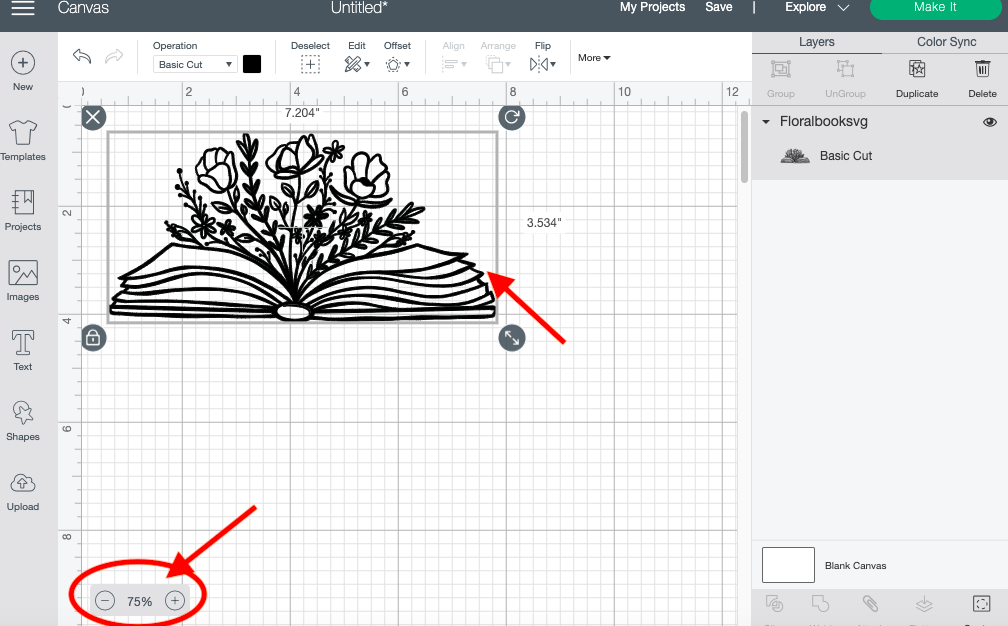
zoom Buttons-Design Space

Click the right circle button with a plus symbol on it to zoom in on your image. This will allow you to see small details in your artwork. You can zoom in on your artwork up to 700%.

Zoom In-design Space

Click the left button with the minus sign symbol on it to zoom out on your image. This will allow you to see the design as a whole. You can zoom out to 25%, which will make your project really small.
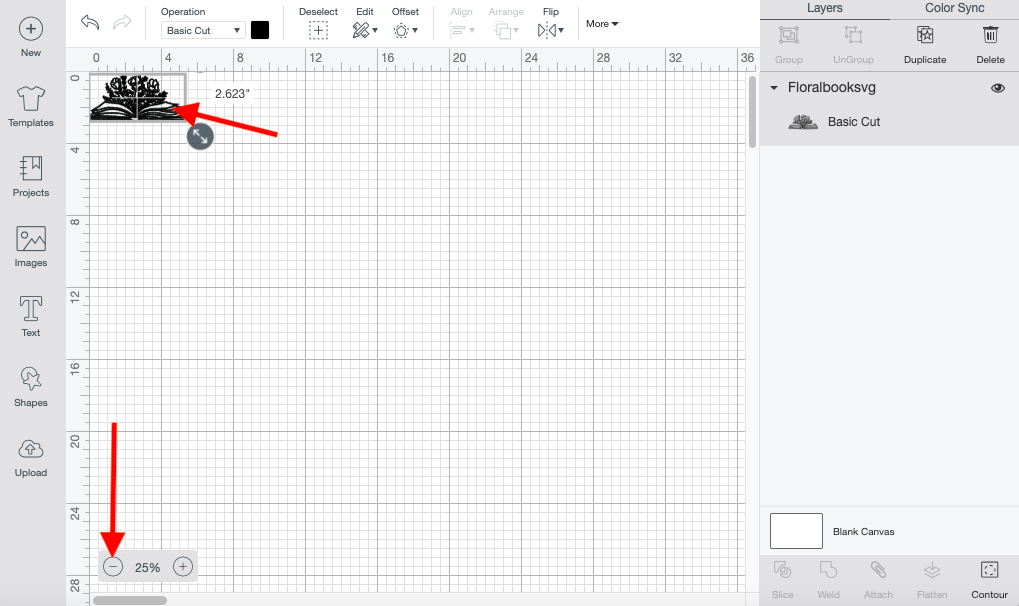
Zoom Out -Design Space

Using the zoom feature is just that easy.

If you like this tutorial, make sure to check out our other tutorial such as creating a distress design and using pattern fill in Cricut Design Space.
Related Tutorials

Cricut Tutorials

How to Create a Layered Image in Cricut Design Space

In this tutorial, you will learn how to create a layered image in Cricut Design Space.
Cricut Tutorials

How To Use The Slice Tool In Cricut Design Space To Split Images

Learn how easily to Split Images in Cricut Design Space using the Slice Tool.
Cricut Tutorials

How to Use a PDF File in Cricut Design Space

In this tutorial we guide you through the steps on using a PDF file in Cricut Design Space.
Cricut Tutorials

Editing Images in Cricut Design Space

Crop, Erase or completely change a design with multiple tools for editing made easy.
Cricut Tutorials

How to Edit Default Material Settings in Cricut Design Space

Learn how to easily change your default material settings in Cricut Design Space!
Cricut Tutorials

How to use Glyphs in Cricut Design Space

Discover how to use font glyphs/alternate characters in Cricut Design Space.

Keep going

You may also like

All cricut tutorials
The weekly drop

Fresh tutorials, trends & free files.

Join 6 million makers getting our best craft guides and exclusive freebies straight to their inbox.

No spam. Unsubscribe anytime.