Get Unlimited Access to Thousands of Premium Fonts and More! Start Creating for Free Now

FontBundles.NET
Pricing
FontBundles.NET

Categories

New

Account

Start Free Trial
How to Access Extra Glyphs and Swashes in Photoshop

By Design Bundles

Photoshop TutorialsIntermediate4 min

How to Access Extra Glyphs and Swashes in Photoshop

Discover how to access font glyphs and swashes in Adobe Photoshop to enhance your designs.

Accessing Glyphs and Swashes is easy in Photoshop on PC or Mac, as the software is specifically designed to be fully compatible with Glyphs.

For the tutorial today we'll be using Lovely Melissa, a gorgeous font which comes with a huge array of 900 glyphs.

The Difference between design where glyphs are used is huge as you can see in the below example:

Lovely Melissa Comparison between Glyphs disabled and enabled:

lovely melissa font glyphs comparison

To access the Lovely Melissa additional Glyphs in Photoshop CC 2015 on Mac or PC, follow the following steps:

1. Install the .OTF version of the font as normal.

2. Launch Photoshop CC.

3. Select Lovely Melissa Font and create your text design.

lovely melissa font photoshop 1

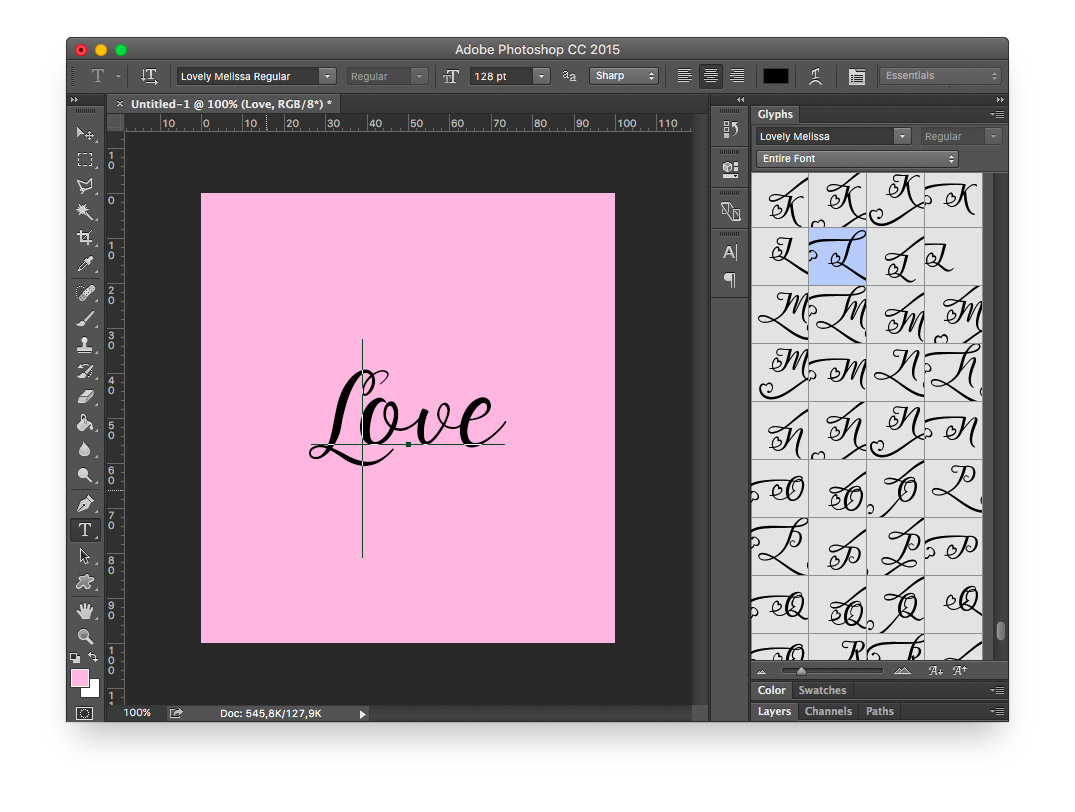
4. Go to Window at the top and select 'Glyphs'.

lovely melissa font photoshop 2

5. The glyphs panel should appear with all of the font's glyphs visible. Move this somewhere nice in your interface so you can see the font design as well.
lovely melissa font photoshop 3

6. Select the character you want to replace with an advanced glyph.

lovely melissa font photoshop 4

7. Double click the glyph you would like to use in the glyphs panel.

lovely melissa font photoshop 5

8. The Glyph will now be replaced with your advanced, swirly amazing design.

lovely melissa font photoshop 6

You can now add styles to additional characters and complete your design in Photoshop CC on Mac or PC.


Related Tutorials

Silhouette Tutorials

Accessing Glyphs and Swashes in Silhouette Studio

Discover how to access and use glyphs in Silhouette Studio.
Font Tutorials

How to Access and Use Font Glyphs on a Windows PC

Learn how to access and use font glyphs on a Windows PC with this tutorial.
Font Tutorials

Accessing Font Glyphs with Font Book on Mac

In this tutorial, learn how to access Font Glyphs on a Mac using Font Book.

Keep going

You may also like

All photoshop tutorials
The weekly drop

Fresh tutorials, trends & free files.

Join 6 million makers getting our best craft guides and exclusive freebies straight to their inbox.

No spam. Unsubscribe anytime.