

By Design Bundles
SCAL Tutorials5 min
Sure Cuts A Lot 4 Basics - Tracing a Black and White Image
*Note- SCAL4 Pro used
1- Open SCAL4 software.
2- To access the trace function, you can either select Trace in the top toolbar (1), or you can go to File > Trace Image(2).
3- A new window will appear. Click on Choose an Image.
4- Find your black and white image and click open. You can use a music note graphic like we are.
5- Your image will appear in the preview window. The red line around the image is the cut line.
6- If there is an issue with the cut lines and they are not as clear as you want them to be, you can adjust the contrast to make it easier for the software to create cut lines.
7- When tracing a black and white image, it is better to select the monochrome option.
8- For corners and sharp areas, you can adjust the smoothness so you will not have as many nodes for the cutting machine to cut.
9- You also have a detail option where you can adjust the detail when you have very intricate designs.
10- If you are creating a print and cut image, you will need to enable Add Image Layer to import the color as well as the cut lines. This will be the same case when printing and cutting colored images also.
11- You also have the option to show the nodes. You will also get a node count. Fewer nodes will make cutting the design easier.
12- If there is a lot of white space, you can use the crop tool to remove some from around your design.
13- When you are happy with your trace and cut lines, click OK.
14- Your design (cut lines) will appear in your design area.
1- Open SCAL4 software.

2- To access the trace function, you can either select Trace in the top toolbar (1), or you can go to File > Trace Image(2).

3- A new window will appear. Click on Choose an Image.

4- Find your black and white image and click open. You can use a music note graphic like we are.

5- Your image will appear in the preview window. The red line around the image is the cut line.

6- If there is an issue with the cut lines and they are not as clear as you want them to be, you can adjust the contrast to make it easier for the software to create cut lines.
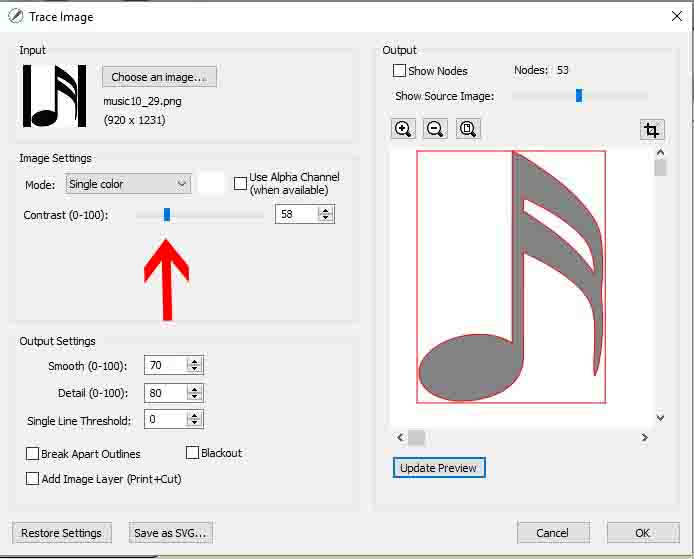
7- When tracing a black and white image, it is better to select the monochrome option.

8- For corners and sharp areas, you can adjust the smoothness so you will not have as many nodes for the cutting machine to cut.

9- You also have a detail option where you can adjust the detail when you have very intricate designs.

10- If you are creating a print and cut image, you will need to enable Add Image Layer to import the color as well as the cut lines. This will be the same case when printing and cutting colored images also.

11- You also have the option to show the nodes. You will also get a node count. Fewer nodes will make cutting the design easier.

12- If there is a lot of white space, you can use the crop tool to remove some from around your design.

13- When you are happy with your trace and cut lines, click OK.

14- Your design (cut lines) will appear in your design area.

Related Tutorials
SCAL Tutorials
Sure Cuts A Lot 4 Basics - Tracing a colored image
SCAL Tutorials
Sure Cuts a Lot 4 Basics - Saving files
SCAL Tutorials
Sure Cuts A Lot 4 Basics - Cutter set up
SCAL Tutorials
Sure Cuts A Lot 4 Basics - The Text tool
SCAL Tutorials
Sure Cuts a Lot 4 Basics - Font Preview function
SCAL Tutorials